# Enable Multi-Site Server-Side Bucket Replication
LLMS index: [llms.txt](/llms.txt)
---
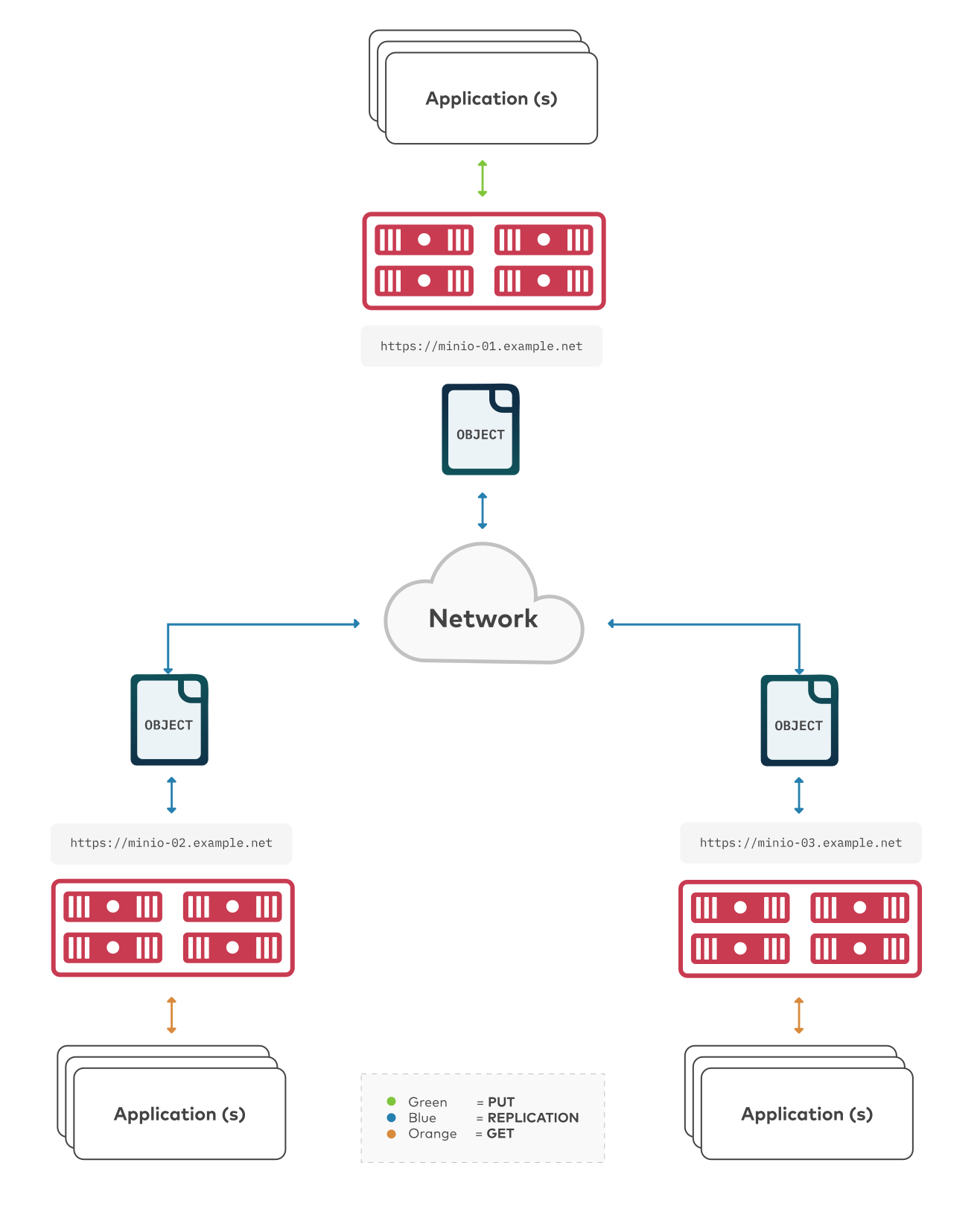
The procedure on this page configures automatic server-side bucket replication between multiple MinIO deployments. Multi-Site Active-Active replication builds on the [Enable Two-Way Server-Side Bucket Replication](/administration/bucket-replication/enable-server-side-two-way-bucket-replication/#minio-bucket-replication-serverside-twoway) procedure with additional considerations required to ensure predictable replication behavior across all sites.
 - To configure replication between arbitrary S3-compatible services, use [`mc mirror`](/reference/minio-mc/mc-mirror/#command-mc.mirror).
- To configure one-way “active-active” replication between two MinIO deployments, see [Enable Two-Way Server-Side Bucket Replication](/administration/bucket-replication/enable-server-side-two-way-bucket-replication/#minio-bucket-replication-serverside-twoway).
- To configure one-way “active-passive” replication between MinIO deployments, see [Enable One-Way Server-Side Bucket Replication](/administration/bucket-replication/enable-server-side-one-way-bucket-replication/#minio-bucket-replication-serverside-oneway).
Multi-Site Active-Active replication configurations can span multiple racks, datacenters, or geographic locations. Complexity of configuring and maintaining multi-site configurations generally increase with the number of sites and size of each site. Test conflict handling, outage recovery, capacity, and network failure scenarios across the exact participating SILO versions before enabling multi-site replication.
> [!NOTE]
> **See also**
>
> - Use the [`mc replicate update`](/reference/minio-mc/mc-replicate-update/#command-mc.replicate.update) command to modify an existing replication rule.
> - Use the [`mc replicate update`](/reference/minio-mc/mc-replicate-update/#command-mc.replicate.update) command with the [`--state "disable"`](/reference/minio-mc/mc-replicate-update/#mc.replicate.update.-state) flag to disable an existing replication rule.
> - Use the [`mc replicate rm`](/reference/minio-mc/mc-replicate-rm/#command-mc.replicate.rm) command to remove an existing replication rule.
## Requirements {#requirements}
You must meet all of the basic requirements for bucket replication described in [Bucket Replication Requirements](/administration/bucket-replication/bucket-replication-requirements/#minio-bucket-replication-requirements).
In addition, to create multi-site bucket replication set up, you must meet the following additional requirements:
### Access to All Clusters {#access-to-all-clusters}
You must have network access and log in credentials with correct permissions to all deployments to set up multi-site active-active bucket replication.
You can access the deployments by installing [`mc`](/reference/minio-mc/#command-mc) and using the command line. Use the [`mc alias set`](/reference/minio-mc/mc-alias-set/#command-mc.alias.set) command to create an alias for each MinIO deployment.
Alias creation requires specifying an access key for a user on the deployment. This user **must** have permission to create and manage users and policies on the deployment.
Specifically, ensure the user has *at minimum*:
- [`admin:CreateUser`](/administration/identity-access-management/policy-based-access-control/#policy-action.admin-CreateUser)
- [`admin:ListUsers`](/administration/identity-access-management/policy-based-access-control/#policy-action.admin-ListUsers)
- [`admin:GetUser`](/administration/identity-access-management/policy-based-access-control/#policy-action.admin-GetUser)
- [`admin:CreatePolicy`](/administration/identity-access-management/policy-based-access-control/#policy-action.admin-CreatePolicy)
- [`admin:GetPolicy`](/administration/identity-access-management/policy-based-access-control/#policy-action.admin-GetPolicy)
- [`admin:AttachUserOrGroupPolicy`](/administration/identity-access-management/policy-based-access-control/#policy-action.admin-AttachUserOrGroupPolicy)
## Considerations {#considerations}
Click to expand any of the following:
> [!DETAILS]- Use Consistent Replication Settings
> MinIO supports customizing the replication configuration to enable or disable the following replication behaviors:
>
> - Replication of [delete operations](/administration/object-management/object-delete/#minio-object-delete)
> - Replication of delete markers
> - Replication of existing objects
> - Replication of metadata-only changes
>
> When configuring replication rules for a bucket, ensure that all MinIO deployments participating in multi-site replication use the *same* replication behaviors to ensure consistent and predictable synchronization of objects.
> [!DETAILS]- Replication of Existing Objects
> MinIO supports automatically replicating existing objects in a bucket.
>
> MinIO requires explicitly enabling replication of existing objects using the [`mc replicate add --replicate`](/reference/minio-mc/mc-replicate-add/#mc.replicate.add.-replicate) or [`mc replicate update --replicate`](/reference/minio-mc/mc-replicate-update/#mc.replicate.update.-replicate) and including the `existing-objects` replication feature flag. This procedure includes the required flags for enabling replication of existing objects.
> [!DETAILS]- Replication of Delete Operations
> MinIO supports replicating [delete operations](/administration/object-management/object-delete/#minio-object-delete) onto the target bucket. Specifically, MinIO can replicate versioning [Delete Markers](https://docs.aws.amazon.com/AmazonS3/latest/userguide/versioning-workflows.html) and the deletion of specific versioned objects:
>
> - For delete operations on an object, MinIO replication also creates the delete marker on the target bucket.
> - For delete operations on versions of an object, MinIO replication also deletes those versions on the target bucket.
>
> MinIO requires explicitly enabling replication of delete operations using the [`mc replicate add --replicate`](/reference/minio-mc/mc-replicate-add/#mc.replicate.add.-replicate) or [`mc replicate update --replicate`](/reference/minio-mc/mc-replicate-update/#mc.replicate.update.-replicate). This procedure includes the required flags for enabling replication of delete operations and delete markers.
>
> MinIO does *not* replicate delete operations resulting from the application of [lifecycle management expiration rules](/administration/object-management/object-lifecycle-management/#minio-lifecycle-management-expiration). Configure matching expiration rules for the bucket on all replication sites to ensure consistent application of object expiration.
## Procedure {#procedure}
This procedure requires repeating steps for each MinIO deployment participating in the multi-site replication configuration. Depending on the number of deployments, this procedure may require significant time and care in implementation. MinIO recommends reading through the procedure *before* attempting to implement the documented steps.
- Configure Multi-Site Bucket Replication Using the Command Line
> - [Create New Bucket Replication Rules](#minio-bucket-replication-multi-site-minio-cli-create-replication-rules)
> - [Validate the Replication Configuration](#minio-bucket-replication-multi-site-minio-cli-verify-replication-config)
### Configure Multi-Site Bucket Replication Using the Command Line `mc` {#configure-multi-site-bucket-replication-using-the-command-line-mc}
This procedure uses the placeholder `ALIAS` to reference the [alias](/reference/minio-mc/mc-alias-set/#alias) each MinIO deployment being configured for replication. Replace these values with the appropriate alias for each MinIO deployment.
This procedure assumes each alias corresponds to a user with the [necessary replication permissions](/administration/bucket-replication/bucket-replication-requirements/#minio-bucket-replication-requirements).
> [!NOTE]
> **Changed: RELEASE.2022-12-24T15-21-38Z**
>
> [`mc replicate add`](/reference/minio-mc/mc-replicate-add/#command-mc.replicate.add) automatically creates the necessary replication targets, removing the need for using the deprecated `mc admin remote bucket add` command. This procedure only documents the procedure as of that release.
#### 1) Create New Bucket Replication Rules {#create-new-bucket-replication-rules}
Use the [`mc replicate add`](/reference/minio-mc/mc-replicate-add/#command-mc.replicate.add) command to add a new replication rule to each MinIO deployment.
```shell
mc replicate add ALIAS/BUCKET \
--remote-bucket 'https://USER:PASSWORD@HOSTNAME:PORT/BUCKET' \
--replicate "delete,delete-marker,existing-objects"
```
- Replace `ALIAS` with the [alias](/reference/minio-mc/mc-alias-set/#alias) of the origin MinIO deployment. The name *must* match the bucket specified when creating the remote target in the previous step.
- Replace `BUCKET` with the name of the bucket to replicate from on the origin deployment.
- Replace the `--remote-bucket` to specify the remote MinIO deployment and bucket to which the `ALIAS/BUCKET` replicates.
The `USER:PASSWORD` must correspond to a user on the remote deployment with the [necessary replication permissions](/administration/bucket-replication/enable-server-side-two-way-bucket-replication/#minio-bucket-replication-serverside-twoway-permissions).
The `HOSTNAME:PORT` must resolve to a reachable MinIO instance on the remote deployment. The `BUCKET` must exist and otherwise meet all other [replication requirements](/administration/bucket-replication/bucket-replication-requirements/#minio-bucket-replication-requirements).
- The `--replicate "delete,delete-marker,existing-objects"` flag enables the following replication features:
- [Replication of Deletes](/administration/bucket-replication/#minio-replication-behavior-delete)
- [Replication of existing Objects](/administration/bucket-replication/#minio-replication-behavior-existing-objects)
See [`mc replicate add --replicate`](/reference/minio-mc/mc-replicate-add/#mc.replicate.add.-replicate) for more complete documentation. Omit any field to disable replication of that component.
Specify any other supported optional arguments for [`mc replicate add`](/reference/minio-mc/mc-replicate-add/#command-mc.replicate.add).
Repeat these commands for each remote MinIO deployment participating in the multi-site replication configuration. For example, a multi-site replication configuration consisting of MinIO deployments `minio1`, `minio2`, and `minio3` would require repeating this step on each deployment for each remote.
Specifically, in this scenario, perform this step twice on each deployment:
- On the `minio1` deployment, once for a rule for `minio2` and again for a separate rule for `minio3`.
- On the `minio2` deployment, once for a rule for `minio1` and again for a separate rule for `minio3`.
- On the `minio3` deployment, once for a rule for `minio1` and again for a separate rule for `minio2`.
#### 2) Validate the Replication Configuration {#validate-the-replication-configuration}
Use [`mc cp`](/reference/minio-mc/mc-cp/#command-mc.cp) to copy a new object to the replicated bucket on one of the deployments.
```shell
mc cp ~/foo.txt ALIAS/BUCKET
```
Use [`mc ls`](/reference/minio-mc/mc-ls/#command-mc.ls) to verify the object exists on the destination bucket:
```shell
mc ls ALIAS/BUCKET
```
Repeat this test on each deployment by copying a new unique file and checking that the file replicates to each of the other deployments.
You can also use [`mc stat`](/reference/minio-mc/mc-stat/#command-mc.stat) to check the file to check the current [replication stage](/administration/bucket-replication/#minio-replication-process) of the object.